
Pricing update: new list prices from November 1, 2026, existing subscriptions unchanged
From November 1, 2026 new subscriptions and passes use updated prices. If you already subscribe, your price stays exactly the same.
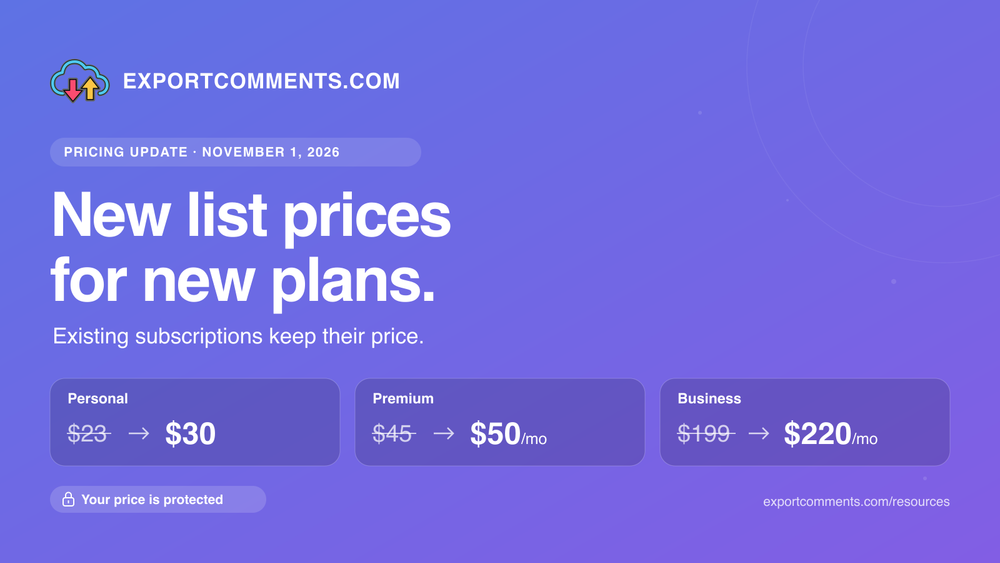
Short version: prices for new subscriptions go up on November 1, 2026; if you already pay for ExportComments, nothing changes for you.
What is changing
Since our last price update, our infrastructure, proxy and platform-access costs have followed two years of inflation. From November 1, 2026 the list prices for new purchases are:
- Personal pass (3 days) — $30 (was $23)
- Premium — $50/month, or $480/year ($40/month equivalent)
- Business — $220/month, or $2,160/year ($180/month equivalent)
Plan features and limits are unchanged. The Free plan stays free.
What is not changing
- Your existing subscription keeps its current price for as long as it stays active on the same plan and billing interval. Monthly and yearly renewals continue at the amount you pay today.
- Prepaid periods are untouched. Nothing extra is charged for time you have already paid for.
- Existing discounts keep their original expiry dates.
- Extra capacity packs keep their current price.
When the new prices apply to you
Only when you start something new: a new Personal pass, a new subscription after cancelling, or a change of plan or billing interval. The price you see at checkout is always the one that applies.
Where to check your price
Open My Subscription in your dashboard. The page shows your current price and whether it is protected.
FAQ
- I pay yearly. Will my next renewal cost more?
No. Yearly subscriptions renew at the same amount as long as they stay active. - I cancelled last month. Can I come back at the old price?
A new subscription uses the prices shown at checkout at that time. Resubscribing before November 1, 2026 locks in the current price. - Does this affect the REST API tiers?
No. API limits are tied to the plan, not to the price paid. See docs.exportcomments.com/tiers. - Who do I ask if an invoice looks wrong?
Reply to any billing email or use the contact page with the invoice number.